Calling Rust from Excel: Building a Native DLL for VBA
Build a native Rust DLL that Excel can call directly through VBA, with a handle‑based FFI that stays safe across the boundary. This article walks from calling conventions and 32‑bit name decoration to a production‑ready VBA wrapper layer.
Table of Contents
Section 1. Introduction
If you’ve worked in finance, research, or any domain where data analysis meets institutional inertia, you know that Excel is immovable. Not because it’s the best tool (it often isn’t) but because it’s there, everyone knows it, and the infrastructure built around it spans decades. The models live in workbooks. The reports are formatted in sheets. The business logic is buried in VBA macros that nobody fully understands anymore.
The problem is that VBA, Excel’s built-in scripting language, was not designed for heavy numerical work. It lacks meaningful typed arrays, has no access to modern numerical libraries, and its performance on anything compute-intensive (matrix operations, iterative solvers, bootstrapped confidence intervals) is genuinely painful. If you need to run a regression on a moderately large dataset, you are either exporting to Python, reaching for an add-in you do not fully trust, or waiting.
I found myself thinking about this in the course of building linreg-core, a self-contained Rust library for statistical regression. The library covers OLS, Ridge, Lasso, Elastic Net, a full battery of diagnostic tests, prediction intervals, and k-fold cross-validation, all implemented from scratch without external math libraries. I had already compiled it to WebAssembly for browser use. The natural next question was: could I make it callable directly from Excel?
The answer is yes, and the mechanism is straightforward in principle: Rust compiles to a native Windows DLL, and VBA can call into a DLL via Declare PtrSafe Function. The distance between “straightforward in principle” and “actually working inside a spreadsheet” is where the interesting engineering lives.
This article is about that distance.
Why Rust?
Several properties make Rust well-suited for this kind of FFI target.
Performance. Rust code runs at native speed with no garbage collector pauses. The coordinate descent solver for Lasso, the Householder QR decomposition, the iterative diagnostic tests—these run in microseconds for datasets that would take VBA seconds or longer. When the DLL returns, the answer is already there.
Memory safety at the boundary. The FFI boundary between VBA and a DLL is dangerous territory. VBA has no concept of ownership, lifetimes, or destructors. Any memory the DLL allocates and does not free is leaked forever. Any pointer VBA passes incorrectly is a silent crash. Rust’s ownership model forces you to be explicit about these boundaries at design time, and the resulting API makes the safety contract visible rather than implicit.
Zero-dependency DLL output. Rust compiles to a .dll with no separate runtime. Drop it in the same folder as the workbook and it works (no Visual C++ redistributable, no Python interpreter, no JVM). This matters because the target users are analysts, not developers. They do not have Visual Studio installed, they likely do not have admin rights to install a runtime package, and they will not troubleshoot a cryptic VCRUNTIME140.dll was not found dialog. The entire value proposition of shipping a DLL collapses the moment there is a hidden prerequisite. Rust’s .cargo/config.toml setting target-feature=+crt-static statically links the C runtime into the DLL itself, so the only remaining dependencies are system DLLs present on Windows 8+.
What I Built
linreg-core exposes the following capabilities to VBA through a handle-based C-compatible API:
- OLS and WLS regression: coefficients, standard errors, t-statistics, p-values, R², adjusted R², F-statistic
- Regularized regression: Ridge, Lasso, and Elastic Net with optional standardization and configurable lambda paths
- Prediction intervals: point predictions with individual coverage intervals
- Diagnostic tests: Breusch-Pagan, White, Jarque-Bera, Shapiro-Wilk, Anderson-Darling, Harvey-Collier, Rainbow, RESET, Durbin-Watson, Breusch-Godfrey
- Influence measures: Cook’s Distance, DFFITS, DFBETAS
- K-fold cross-validation: for OLS, Ridge, Lasso, and Elastic Net
All of it is callable from an Excel spreadsheet with a few lines of VBA.
The End Result
Here is what the simplest use case looks like from the VBA side:
Dim tbl As Variant
tbl = LinReg_OLS(Range("B2:B21"), Range("C2:F21"))
Range("H2").Resize(UBound(tbl, 1) + 1, UBound(tbl, 2) + 1).Value = tbl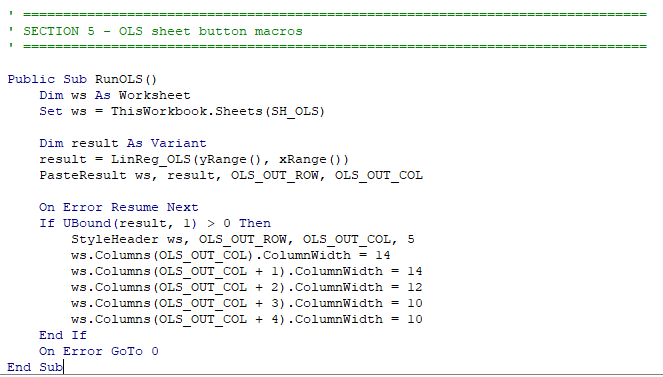
Three lines. The first calls the high-level VBA wrapper with a response range and a predictor matrix range. The second pastes the result into the sheet. What comes back is a formatted table: a header row followed by one row per coefficient containing the term name, coefficient estimate, standard error, t-statistic, and p-value, then a blank separator and four summary rows (R², adjusted R², F-statistic with its p-value, and MSE with n).
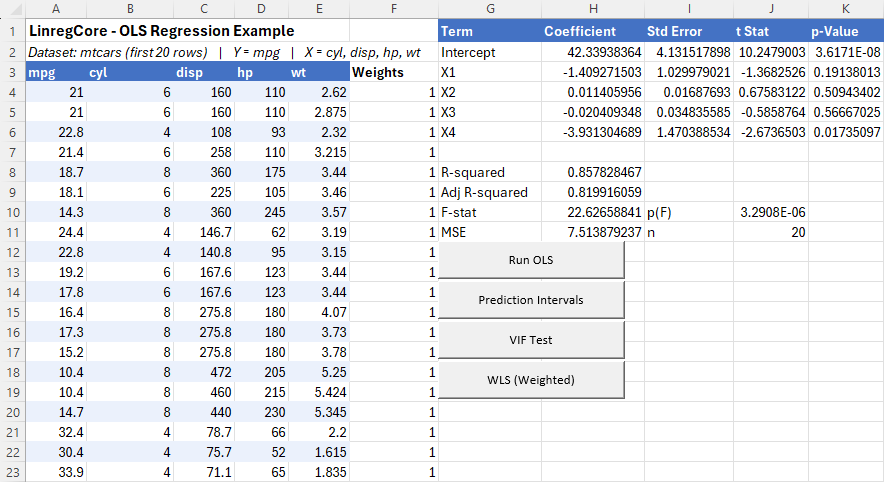
Paste it anywhere in the workbook. Format it however you like. It is just values in cells.
Getting to those three lines required solving problems in Rust’s build system, Windows calling conventions, 32-bit symbol decoration, and safe cross-language handle management. The rest of this article walks through each of those in turn.
Section 2. How VBA Calls a DLL
Before designing anything, it helps to understand exactly what happens at runtime when VBA calls a DLL function. The mechanism is older than Rust by decades, and it is remarkably simple.
The Declare Statement
VBA exposes DLL functions through a Declare statement. Here is the one for LR_OLS:
Private Declare PtrSafe Function LR_OLS Lib "linreg_core_x64.dll" _
    (ByVal y_ptr As LongPtr, ByVal n As Long, _
     ByVal x_ptr As LongPtr, ByVal p As Long) As LongPtr
VBA’s Declare mechanism resolves function pointers using the Windows loader (LoadLibrary and GetProcAddress) internally. When the DLL is not already loaded, VBA will load it by searching for the filename, but that search follows Windows’ DLL search order, which can find the wrong file if another copy of the DLL exists elsewhere on the system.
To avoid this, our LinregCore.bas exposes a public LR_Init() sub that explicitly calls LoadLibraryA with the full path before any DLL function is ever invoked. The private DLL declaration uses an Alias "LR_Init" clause (renaming it to LR_InitDLL in VBA) to avoid name collision with the public wrapper sub:
Public Sub LR_Init()
    #If Win64 Then
        LoadLibraryA ThisWorkbook.Path & "\linreg_core_x64.dll"
    #Else
        LoadLibraryA ThisWorkbook.Path & "\linreg_core_x86.dll"
    #End If
End Sub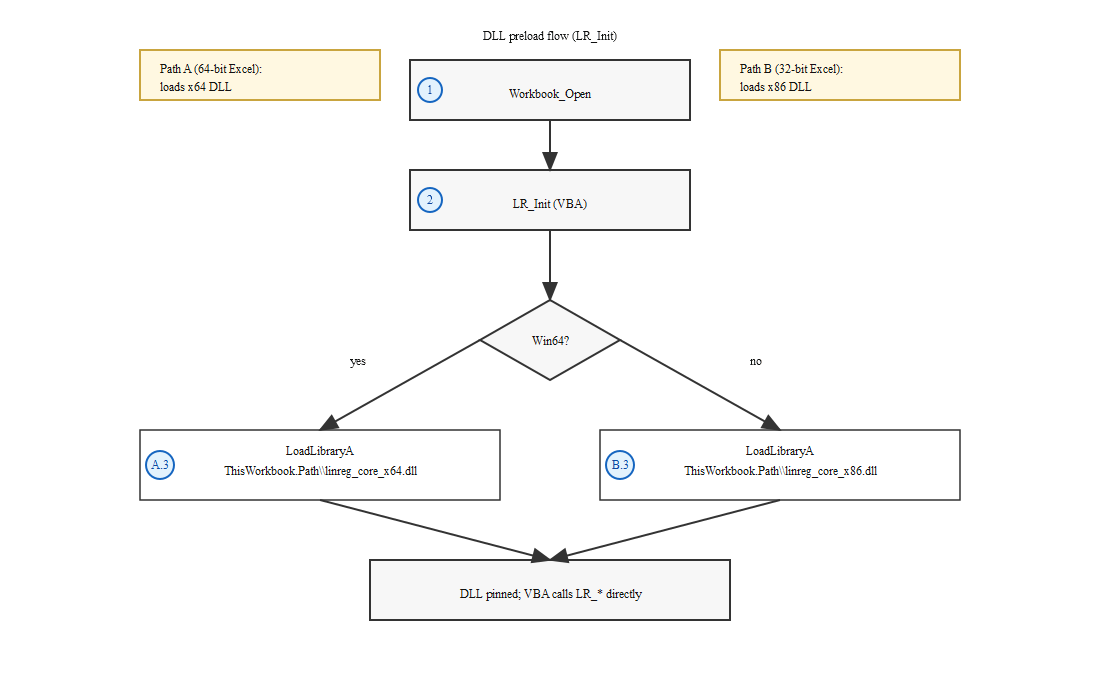
This should be called from Workbook_Open so the correct DLL is pinned in the process before anything else runs (the user wires this up once in the ThisWorkbook module). From that point on, GetProcAddress resolves "LR_OLS" to a function pointer and every subsequent call goes through it directly. The DLL does not need to know anything about VBA, COM, or the Excel object model. It only needs to export a symbol with the right name and a C-compatible calling convention.
PtrSafe was introduced in VBA7 (Office 2010) to indicate that a declaration is safe to run under 64-bit Office. Any Declare statement in a modern workbook should use it. The older Declare Function form (without PtrSafe) still compiles on 32-bit VBA but is not allowed in 64-bit VBA. See the Microsoft Declare statement reference for the full syntax.
Calling Conventions
A calling convention defines two things: how arguments are placed on the stack (or in registers), and who is responsible for cleaning the stack up afterward (the caller or the callee). Getting this wrong does not produce a compile error. It produces a crash, or worse, silent data corruption.
On Windows, the two conventions that matter here are cdecl (caller cleans up) and stdcall (callee cleans up). Rust functions without an explicit extern declaration use the Rust ABI, which is unstable and not callable from C at all. To export a C-callable function you must write extern "C", which gives you cdecl, but that is wrong for 32-bit Windows, where VBA expects stdcall. Using extern "system" in Rust resolves this cleanly: on 32-bit Windows it maps to stdcall; on 64-bit Windows it maps to the x64 ABI, which has only one calling convention and makes the cdecl/stdcall distinction irrelevant. See the Microsoft calling conventions reference for the low-level details, and the Rust reference on extern ABI strings for how Rust maps "system" per platform.
All exported functions in this library use extern "system":
#[no_mangle]
pub extern "system" fn LR_OLS(
    y_ptr: *const f64,
    n: i32,
    x_ptr: *const f64,
    p: i32,
) -> usize { ... }
#[no_mangle] tells the Rust compiler to export the symbol with the exact name written in source, suppressing Rust’s normal name mangling. Without it, the linker would emit something unrecognizable (Rust’s legacy scheme produces Itanium-style names like _ZN11linreg_core3ffi3ols6LR_OLS17h<hash>E, and the current v0 scheme—default since Rust 1.56, standardized in RFC 2603—produces an entirely different format starting with _R). Either way, GetProcAddress("LR_OLS") would fail silently. The Rust Nomicon’s FFI chapter covers #[no_mangle] and the full set of FFI considerations in depth.
Types That Cross Cleanly
The FFI boundary only understands the C type system. The following types transfer without any conversion on both 32-bit and 64-bit Windows:
| VBA type | Rust type | Size | Notes |
|---|---|---|---|
Double |
f64 |
8 bytes | IEEE 754 double (identical layout on both sides) |
Long |
i32 |
4 bytes | VBA Long is always 32 bits, even on 64-bit Office |
LongLong |
i64 |
8 bytes | VBA7 (64-bit Office) only |
LongPtr |
usize |
4 or 8 bytes | Platform-width integer; used for handles and raw pointers. VBA7-only type. |
Byte |
u8 |
1 byte | Useful for byte buffers (e.g. string output) |
A few things worth noting:
- VBA
Longis always 32 bits. This trips up cross-platform C/C++ programmers: on 64-bit Linux and macOS (LP64 data model), Clongis 64 bits, but on 64-bit Windows (LLP64 data model)longremains 32 bits, same as VBA. In Rust, map VBALongtoi32, noti64and notisize. LongPtris the idiomatic VBA type for raw pointers and opaque handles. It compiles asLong(32-bit) under 32-bit Office andLongLong(64-bit) under 64-bit Office, matching Rust’susizeon both targets. This is how we pass handles out of the DLL and how VBA passes array pointers in. Note thatLongPtris only available in VBA7 (Office 2010+), which is why all high-level wrapper functions in this library require VBA7.- VBA has no unsigned integer type. Boolean flags are passed as
Long(i32) with 0 = false and 1 = true.
To pass an array of doubles to the DLL, VBA uses VarPtr() to obtain the address of the first element:
Dim y(19)  As Double          ' response vector, n=20
Dim x(79)  As Double          ' flat array for predictor matrix, n=20 × p=4 = 80 elements (row-major)
' ... fill y and x ...
Dim h As LongPtr
h = LR_OLS(VarPtr(y(0)), 20, VarPtr(x(0)), 4)
On the Rust side, that LongPtr arrives as *const f64. Rust reconstructs a slice with std::slice::from_raw_parts(y_ptr, n) and immediately copies it into a Vec<f64>. The memory is owned by VBA for the lifetime of the call; copying it before returning ensures Rust never holds a pointer into VBA-managed memory after the function exits.
For string output, the pattern is a caller-allocated byte buffer (the same convention used throughout the Win32 API):
' VBA: caller allocates a 512-byte buffer, passes pointer + capacity
Dim buf(0 To 511) As Byte
Dim written As Long
written = LR_GetLastError(VarPtr(buf(0)), 512)
' Use `written` (not the buffer size) as the Left$ length.
' StrConv converts the whole byte array including trailing zeros;
' Left$(…, written) trims exactly at the end of the message.
Dim msg As String
If written > 0 Then msg = Left$(StrConv(buf, vbUnicode), written)
// Rust: writes a null-terminated byte string into the caller's buffer
// (ASCII-safe; VBA decodes via StrConv with the ANSI codepage).
// Returns the number of bytes written (not counting the null terminator)
#[no_mangle]
pub extern "system" fn LR_GetLastError(out_ptr: *mut u8, out_len: i32) -> i32 {
// ... copies bytes, null-terminates, returns count written
}VBA allocates the buffer and passes its address. Rust writes into it and null-terminates. The return value tells VBA exactly how many bytes were written, which is what Left$ uses (passing the buffer capacity instead would include null bytes and garbage for any message shorter than the buffer). Neither side frees the other’s memory.
What Cannot Cross
Several Rust types are fundamentally incompatible with VBA:
Stringand&str: Rust strings are UTF-8 byte slices with length metadata stored on the stack alongside the pointer. They have no stable C ABI. Passing a RustStringacross the boundary hands VBA a pointer to internal Rust heap memory it cannot interpret and must never free.Vec<T>: AVecis a (pointer, length, capacity) triple, and only the Rust allocator knows how to free it. Handing aVecto VBA would either leak memory or cause a double-free when Rust drops it.Box<T>and any owned heap value: Same problem. Ownership semantics end at the FFI boundary.- References (
&T,&mut T): At runtime a Rust reference is just a pointer, but borrow-checker guarantees do not extend into VBA. If VBA caches a pointer past the duration of the call, there is nothing preventing it from reading freed memory. - Enums with payloads (
Result,Option, non-repr(C)enums): These have Rust-specific discriminant layouts that are not guaranteed to be stable or C-compatible without explicit#[repr(C)].
The rule at the boundary: everything is either a scalar or a raw pointer, and ownership must be explicit. If Rust allocates it, Rust frees it. If VBA allocates it, the DLL only writes into it and never frees it. This discipline is what makes the design safe, and it points directly toward the handle-based API design covered in Section 4.
Section 3. The 32-bit Problem: Stdcall Name Decoration
Everything in Section 2 is true and sufficient (for 64-bit Office). On 32-bit Office—still common in enterprise environments where IT standardized on 32-bit Office years ago and never changed—there is an additional problem that is entirely invisible until you try to call a function and VBA raises runtime error 453: Specified DLL function not found.
The DLL is loaded. The function exists. But VBA cannot find it. The reason is stdcall name decoration.
What Decoration Means
On x86 Windows, the MSVC linker applies a specific decoration to any function exported with the stdcall calling convention. The exported symbol name becomes:
_FunctionName@Nwhere N is the total number of bytes those arguments occupy on the stack. For LR_OLS, which takes two pointers and two i32 values (each 4 bytes on a 32-bit target):
_LR_OLS@16 ; 4 + 4 + 4 + 4 = 16 bytes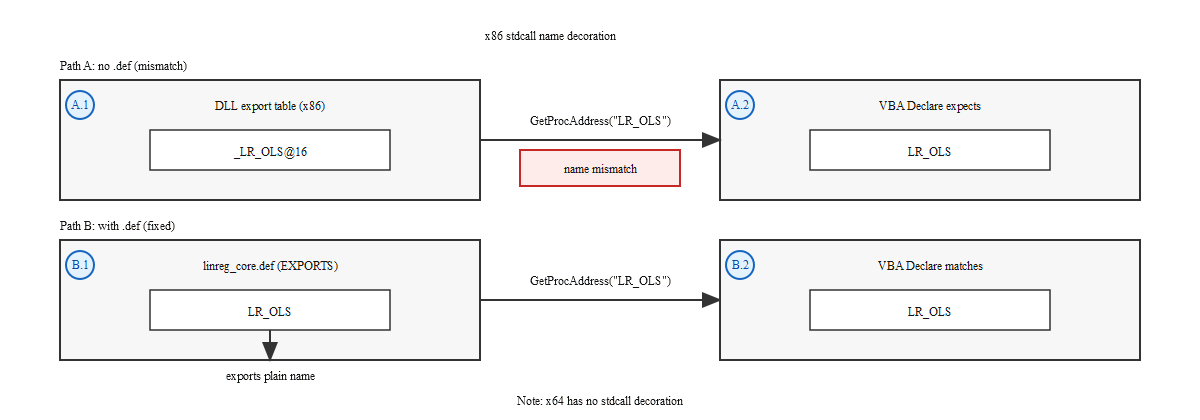
A simpler getter like LR_GetRSquared, which takes one usize handle (4 bytes on x86):
_LR_GetRSquared@4A vector getter like LR_GetCoefficients(handle: usize, out_ptr: *mut f64, out_len: i32):
_LR_GetCoefficients@12 ; 4 + 4 + 4 = 12 bytesEvery exported symbol gets this treatment. The linker is doing what the ABI requires: encoding the stack cleanup size into the symbol name so that mismatched calling conventions can be caught at link time in C programs. That is genuinely useful in C, but it is fatal for VBA. The MSVC EXPORTS documentation confirms this decoration rule for stdcall functions.
Why VBA Cannot Find the Symbol
VBA’s Declare statement specifies a plain name:
At runtime, VBA calls GetProcAddress(hDLL, "LR_OLS"). The DLL exports "_LR_OLS@16". Those two strings do not match. GetProcAddress returns NULL. VBA raises runtime error 453 (“Specified DLL function not found”) the first time you call the function.
This does not fail at module load time. The workbook opens normally, the Declare statement compiles without complaint, and everything appears fine—until someone actually clicks the button.
Critically, #[no_mangle] does not help here. #[no_mangle] suppresses Rust’s own name mangling, but the stdcall decoration is applied afterward by the MSVC linker as a separate step. The two mechanisms are independent. You need both #[no_mangle] (to stop Rust) and a .def file (to stop the linker).
The Solution: A Module Definition File
A module definition file (.def) is a plain-text file passed to the MSVC linker that controls DLL exports. When a symbol is listed in the EXPORTS section by its plain name, the linker exports it under that name regardless of its internal decorated form.
The linreg_core.def file for this library looks like this (abbreviated):
LIBRARY linreg_core
EXPORTS
    LR_Free
    LR_GetLastError
    LR_OLS
    LR_GetRSquared
    LR_GetCoefficients
    ; ... all other exported symbols ...
With this file present, the linker maps _LR_OLS@16 internally but publishes it in the DLL’s export table as LR_OLS. GetProcAddress("LR_OLS") now succeeds. The VBA Declare statement works.
The .def file must list every symbol that VBA will call. If a function is added to the Rust FFI layer but not added to the .def file, the 32-bit build will silently revert to the decorated name and that function will fail with error 453 at runtime. Keeping the two files synchronized is one of the maintenance costs of supporting 32-bit Office.
Automating It with build.rs
Passing the .def file manually on every build is error-prone, and it should only be passed for 32-bit Windows MSVC targets (since 64-bit targets do not need it). Cargo’s build script (build.rs) handles this automatically:
fn main() {
    // Only relevant for the ffi (DLL) build.
    if std::env::var("CARGO_FEATURE_FFI").is_err() {
        return;
    }

    let arch = std::env::var("CARGO_CFG_TARGET_ARCH").unwrap_or_default();
    let os   = std::env::var("CARGO_CFG_TARGET_OS").unwrap_or_default();
    let env  = std::env::var("CARGO_CFG_TARGET_ENV").unwrap_or_default();

    if arch == "x86" && os == "windows" && env == "msvc" {
        let manifest = std::env::var("CARGO_MANIFEST_DIR").unwrap();
        println!("cargo:rustc-cdylib-link-arg=/DEF:{manifest}/linreg_core.def");
    }
}
A few things worth unpacking:
CARGO_FEATURE_FFI: Cargo sets an environment variable for each enabled feature. Checking for this means the.deflogic only runs when building the DLL (--features ffi), not during regularcargo testor WASM builds.CARGO_CFG_TARGET_ARCH/_OS/_ENV: These give the target triple components at build time, not the host machine. This is what lets the samebuild.rswork correctly when cross-compiling.cargo:rustc-cdylib-link-arg: Thisprintln!directive tells Cargo to pass/DEF:<path>to the linker, but only forcdyliblink steps. It has no effect onrlibbuilds or WASM compilation, so it does not pollute those targets. See the Cargo build script reference for the full set of supported instructions.
The result: cargo build --release --target i686-pc-windows-msvc --features ffi automatically produces a correctly built 32-bit DLL with plain undecorated export names, and cargo build --release --target x86_64-pc-windows-msvc --features ffi produces a 64-bit DLL without the .def file involved at all.
Why 64-bit Doesn’t Have This Problem
On x86_64 Windows, Microsoft defined a single unified calling convention for the platform. There is no cdecl vs stdcall distinction; all functions use the Microsoft x64 ABI. Because there is only one convention, there is no need to encode stack cleanup size into the symbol name. Exported symbols are emitted with their plain names: LR_OLS, LR_GetRSquared, exactly as written with #[no_mangle]. The .def file is unnecessary.
This asymmetry is why the build.rs guard exists. The 64-bit build is simpler by design; the 32-bit build carries a compatibility cost that is entirely a consequence of the older ABI.
Section 4. Designing a Safe API Across the Boundary
Sections 2 and 3 covered the mechanical problems (how VBA finds symbols, how calling conventions work, how to strip name decoration). This section is about the design problem: given that VBA cannot participate in Rust’s ownership model at all, how do you hand results back to a caller that has no concept of destructors?
The Core Constraint
VBA is a single-threaded scripting environment with automatic memory management via COM reference counting (when an object variable goes out of scope or is set to Nothing, IUnknown::Release is called and the object is destroyed deterministically when its count reaches zero). From VBA’s perspective, every value it holds is either a scalar, a COM object, or an array. It has no free(), no drop(), no RAII. When VBA receives a value from a DLL function, it has no mechanism to run cleanup code when that value goes out of scope.
This rules out any design where the DLL allocates memory and hands ownership across the boundary. If the DLL returns a pointer to a heap-allocated RegressionOutput struct, VBA has no way to free it. If the DLL returns a heap-allocated string, same problem. The boundary enforces a strict rule: Rust owns everything on the Rust side, and VBA never takes ownership of anything.
The Handle Pattern
The solution is one of the oldest patterns in systems programming: an opaque integer handle that stands in for the actual object. SQLite uses it (sqlite3* handles for database connections), OpenSSL uses it (SSL* and SSL_CTX* handles for TLS state), and the Windows API is built almost entirely on it (HANDLE, HWND, HKEY). The caller receives an integer that means nothing by itself; it is just a key that the library uses to look up the real data on its side of the boundary.
Our implementation uses usize as the handle type, which is an unsigned integer with platform-native width (32 bits on x86, 64 bits on x64). Two values are special:
- 0 always means an error occurred. VBA checks
If h = 0 Thenimmediately after every fit call. - Any value ≥ 1 is a valid handle that can be passed to getter functions.
This is intentionally simpler than SQLite’s pointer-based handles. VBA cannot dereference a usize or accidentally corrupt it. It can only pass it back, which is exactly the behavior we want.
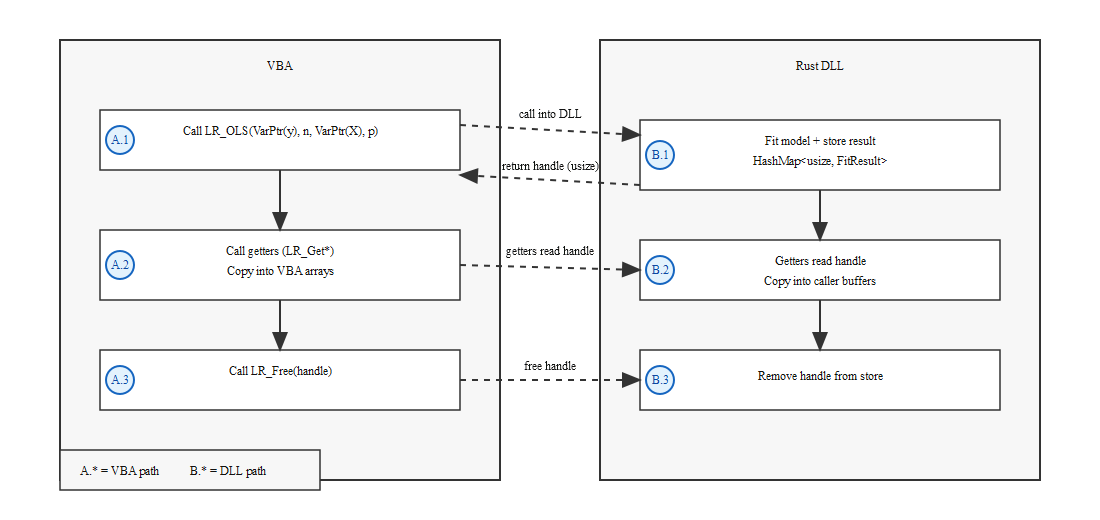
LR_Free releases the stored result.The Handle Store
All live results are kept in a single global HashMap behind a Mutex, initialized lazily via OnceLock:
static NEXT_ID: AtomicUsize = AtomicUsize::new(1);
static STORE: OnceLock<Mutex<HashMap<usize, FitResult>>> = OnceLock::new();

pub fn insert(result: FitResult) -> usize {
    let id = NEXT_ID.fetch_add(1, Ordering::Relaxed);
    store().lock().unwrap().insert(id, result);
    id
}

pub fn with<T>(id: usize, f: impl FnOnce(&FitResult) -> T) -> Option<T> {
    let guard = store().lock().unwrap();
    guard.get(&id).map(f)
}

pub fn remove(id: usize) {
    store().lock().unwrap().remove(&id);
}
A few design decisions worth calling out:
AtomicUsize for ID generation. fetch_add returns the old value and increments atomically. Since NEXT_ID starts at 1, the first handle issued is 1 (0 is permanently reserved as the error sentinel). On 64-bit targets this never overflows in practice (issuing one handle per microsecond would run for over 500,000 years); on 32-bit targets the counter wraps at ~4 billion, which is unreachable in a normal VBA session but worth noting.
OnceLock for lazy initialization. The HashMap is not constructed at program startup but on the first call to store(). OnceLock provides thread-safe, exactly-once initialization: the first thread to call get_or_init runs the initializer, and any other threads that arrive concurrently block until it completes. After initialization, get() is a plain atomic load with no blocking. The post-init read path is wait-free; the initialization path itself is not.
Mutex for thread safety. VBA itself is single-threaded, but the DLL may theoretically be called from Excel’s automation object model or from a background thread in a host process. The Mutex ensures the HashMap is never accessed concurrently from multiple threads.
with() holds the lock during the closure. The getter pattern takes a FnOnce(&FitResult) closure rather than returning a cloned value. This means the lock is held while the getter reads from the stored result, then released. No data escapes the lock.
remove() is idempotent. Calling LR_Free on an already-freed or nonexistent handle does nothing (HashMap::remove on a missing key is a no-op). This makes double-free safe from VBA.
The FitResult Enum
Every result variant (OLS, Ridge, Lasso, Elastic Net, WLS, diagnostics, prediction intervals, vectors, matrices, and cross-validation) is stored as a single FitResult enum:
pub enum FitResult {
    Ols(RegressionOutput),
    Ridge(RidgeFit),
    Lasso(LassoFit),
    ElasticNet(ElasticNetFit),
    Wls(WlsFit),
    Diagnostic(DiagnosticResult),
    PredictionInterval(PredictionIntervalOutput),
    Vector(Vec<f64>),
    Matrix { data: Vec<f64>, rows: usize, cols: usize },
    CV(CVResult),
}
The shared getter functions (LR_GetRSquared, LR_GetCoefficients, etc.) match on this enum to serve the relevant variant. A handle pointing to a Diagnostic result will return f64::NAN from LR_GetRSquared (the getter falls through to a wildcard arm) rather than crashing. This makes the API robust to mismatched handle/getter pairs.
The lifecycle looks like this from VBA’s perspective:
' 1. Fit: Rust stores the result, VBA receives an integer key
Dim h As LongPtr
h = LR_OLS(VarPtr(y(0)), n, VarPtr(x(0)), p)
If h = 0 Then MsgBox GetLastErrorMsg() : Exit Sub

' 2. Query: VBA passes the key back; Rust looks up and reads the result
Dim r2 As Double
r2 = LR_GetRSquared(h)

' 3. Free: Rust removes the HashMap entry; Drop runs automatically
LR_Free h
Rust’s Drop trait handles cleanup of the stored value automatically when remove() evicts it from the HashMap. VBA never touches the actual memory.
Error Handling
When a fit function fails (invalid inputs, singular matrix, convergence failure), it returns 0 and stores a diagnostic message in a thread-local string:
VBA retrieves it via the byte-buffer pattern from Section 2:
Using a thread-local rather than a global Mutex<String> is the right choice for three reasons. First, thread-locals require no atomic operations or kernel primitives (access is as cheap as a pointer dereference). Second, the error slot is per-thread: if the DLL is ever called from two threads concurrently, each caller has its own independent last-error string rather than a shared one that one thread could overwrite before the other retrieves it. Third, Mutex::lock() returns an Err if the mutex is poisoned (another thread panicked while holding it), requiring an unwrap() that can itself panic; RefCell has no such failure mode in a single-threaded context.
Why Not Return JSON Strings?
The WASM version of this library does exactly that (every function returns a JSON string, and the JavaScript caller uses JSON.parse()). That works well in a browser context because JavaScript has native JSON support and string handling built into the language.
VBA has neither. There is no JSON.parse() in VBA. Parsing a JSON string from a DLL would require either bundling a COM JSON library, implementing a custom parser, or calling out to ScriptControl (none of which belong in what should be a simple numerical call). Beyond the parsing problem, returning a string from the DLL brings back the ownership problem: a heap-allocated string on the Rust side cannot be freed by VBA, and the byte-buffer pattern (caller allocates, DLL writes) only works for fixed-size or bounded output.
The handle-plus-getter approach solves both. Each getter is one typed function call that returns a scalar or writes into a caller-allocated buffer. No parsing, no allocation on the Rust side that VBA must manage, and no COM dependency. VBA assembles the table it needs by calling exactly the getters it wants and ignoring the rest.
Section 5. The Internal Type System
Section 4 introduced the FitResult enum and the single-HashMap store. The enum has ten variants: Ols, Ridge, Lasso, ElasticNet, Wls, Diagnostic, PredictionInterval, Vector, Matrix, and CV. That variety creates an API design problem: different variants expose different fields. OLS has an F-statistic; Ridge has an effective degrees-of-freedom value; Lasso has a nonzero-coefficient count; a DFBETAS result is a matrix. How do you expose all of this through a typed C API without creating a getter for every field of every type?
The answer is a three-tier getter taxonomy.
The Coefficient Layout Asymmetry
There is one deliberate inconsistency between OLS/WLS and the regularized models that any caller needs to know: where the intercept lives.
For OLS and WLS, coefficients includes the intercept as its first element: [β₀, β₁, ..., βₖ]. LR_GetNumCoefficients returns k+1 and LR_GetCoefficients copies k+1 values.
For Ridge, Lasso, and Elastic Net, coefficients contains only the slopes. The intercept is stored in a dedicated field and is retrieved via LR_GetIntercept. LR_GetNumCoefficients returns k and LR_GetCoefficients copies k values.
LR_GetIntercept is available for OLS and all three regularized models, but not for WLS (a WLS handle falls through to the wildcard arm and returns NAN). For OLS, LR_GetIntercept returns coefficients[0]; for Ridge, Lasso, and Elastic Net it returns the dedicated intercept field. For WLS, retrieve the intercept from LR_GetCoefficients (element zero, since WLS coefficients also include the intercept as the first element).
Tier 2: Type-Specific Getters
Some fields only exist on one or two variants and do not make sense as shared getters.
Regularized-specific: - LR_GetIntercept: dedicated intercept for Ridge, Lasso, Elastic Net; coefficients[0] for OLS - LR_GetDF: effective degrees of freedom for Ridge; residual df for OLS; NAN for others - LR_GetNNonzero: count of non-zero slopes for Lasso and Elastic Net; -1 for others - LR_GetConverged: 1 if coordinate descent converged, 0 if not, -1 for non-iterative models
Diagnostic-specific:
The DiagnosticResult struct stored in the Diagnostic variant holds four fields:
pub struct DiagnosticResult {
    pub statistic:       f64,  // primary test statistic
    pub p_value:         f64,  // two-tailed p-value, or NAN if not produced
    pub df:              f64,  // degrees of freedom (BG lag order; 0.0 if not applicable)
    pub autocorrelation: f64,  // ρ ≈ 1 − DW/2 for Durbin-Watson; 0.0 otherwise
}
Four getters expose it: LR_GetStatistic, LR_GetPValue, LR_GetTestDF, and LR_GetAutocorrelation. Every diagnostic fit function (Breusch-Pagan, Jarque-Bera, Shapiro-Wilk, Anderson-Darling, Harvey-Collier, White, Rainbow, RESET, Durbin-Watson, Breusch-Godfrey) returns a Diagnostic handle that these four getters can read.
Two tests use non-default fields. Breusch-Godfrey populates df with the lag-order degrees of freedom (the test’s chi-squared statistic has lag_order degrees of freedom); all other tests store 0.0 there. Durbin-Watson does not produce a single p-value (the classical DW table approach provides upper and lower bounds, not a point p-value). The FFI layer stores NAN in the p_value field and the estimated autocorrelation ρ ≈ 1 − DW/2 in the autocorrelation field. Callers who want the implied autocorrelation coefficient read the autocorrelation field:
Tier 3: Generic Container Getters
Not every result fits a named-field model. Cook’s distances, DFFITS values, VIF values, and lambda sequences are all plain float arrays (not named statistics, just n or p numbers). Rather than creating a dedicated result type for each, these are stored in the Vector and Matrix variants and retrieved via five generic getters: LR_GetVectorLength, LR_GetVector, LR_GetMatrixRows, LR_GetMatrixCols, and LR_GetMatrix.
The vector case is straightforward:
' Read Cook's distances
Dim hCD As LongPtr
hCD = LR_CooksDistance(VarPtr(y(0)), n, VarPtr(x(0)), p)
If hCD = 0 Then MsgBox GetLastErrorMsg() : Exit Sub

Dim nVals As Long
nVals = LR_GetVectorLength(hCD)        ' = n observations

Dim cooks() As Double
ReDim cooks(0 To nVals - 1)
LR_GetVector hCD, VarPtr(cooks(0)), nVals
LR_Free hCD
The same three-call pattern (length, allocate, read) works for DFFITS, VIF, and the lambda path.
DFBETAS is the one genuinely two-dimensional result: each of the n observations has a standardized influence value for each of the k+1 coefficients (intercept plus slopes). The result is stored as FitResult::Matrix with shape (n rows × (k+1) cols) in row-major order (element [i][j] is at data[i * cols + j]). The caller queries dimensions first, pre-allocates a flat buffer of rows × cols doubles, and reads the whole thing in a single call:
' Read DFBETAS matrix
Dim hDF As LongPtr
hDF = LR_DFBETAS(VarPtr(y(0)), n, VarPtr(x(0)), p)
If hDF = 0 Then MsgBox GetLastErrorMsg() : Exit Sub

Dim nRows As Long, nCols As Long
nRows = LR_GetMatrixRows(hDF)          ' = n observations
nCols = LR_GetMatrixCols(hDF)          ' = k+1 coefficients (incl. intercept)

Dim buf() As Double
ReDim buf(0 To nRows * nCols - 1)     ' flat row-major buffer
LR_GetMatrix hDF, VarPtr(buf(0)), nRows * nCols
LR_Free hDF

' Element [i, j] is at buf(i * nCols + j)
Row-major layout was chosen because the index arithmetic (i * nCols + j) is unambiguous regardless of the caller’s own internal storage conventions. The VBA high-level wrapper reshapes this flat buffer into a 2D VBA array for presentation, but the DLL itself only ever deals in flat buffers.
The Vector and Matrix variants exist precisely because the type system cannot anticipate every combination. Once the generic getters were written, every new analysis type that stores its result as a flat array or matrix gets them for free (Cook’s distances, DFFITS, VIF, DFBETAS, and lambda paths all share the same five getter functions with no new DLL exports required).
Section 6. Building for Both Architectures
Sections 3 and 4 covered the why of the dual-architecture support (stdcall decoration on 32-bit and the handle store design). This section covers the how: the exact build setup, commands, and file placement that produce the two DLLs.
Prerequisites
You need two things that are not part of the default Rust installation.
The 32-bit MSVC target for Rust. On a 64-bit Windows machine, the default Rust target is x86_64-pc-windows-msvc. The 32-bit target must be added explicitly:
rustup target add i686-pc-windows-msvcThe 32-bit MSVC linker and libraries. The Rust toolchain provides the compiler, but it delegates to the MSVC linker (link.exe) for the final link step. A standard “Desktop development with C++” install via Visual Studio Build Tools covers both architectures. If you have Visual Studio installed but 32-bit builds fail with error: linker 'link.exe' not found, open the Visual Studio Installer and ensure “MSVC v14x – VS 2022 C++ x86/x64 build tools” is checked under the “Desktop development with C++” workload.
The ffi Feature Gate
The FFI layer is not compiled by default. Looking at Cargo.toml:
[features]
default = ["wasm"]
wasm    = ["dep:wasm-bindgen", "dep:web-sys", "dep:js-sys", "dep:csv", "getrandom/js"]
python  = ["pyo3", "numpy"]
numpy   = ["dep:numpy"]
validation = []
ffi     = []
The entire src/ffi/ module tree is gated behind #[cfg(feature = "ffi")] in src/lib.rs. A plain cargo build produces the WASM-capable library without any FFI code. This keeps the FFI bindings from contaminating normal library builds, test runs, or crates.io publishing. The ffi feature has no dependencies of its own (it is a pure compilation gate).
Build Commands
# 64-bit DLL for 64-bit Excel
cargo build --release --target x86_64-pc-windows-msvc --features ffi

# 32-bit DLL for 32-bit Excel
cargo build --release --target i686-pc-windows-msvc --features ffi
Both commands pick up .cargo/config.toml automatically, which applies target-feature=+crt-static to each target:
[target.x86_64-pc-windows-msvc]
rustflags = ["-C", "target-feature=+crt-static"]

[target.i686-pc-windows-msvc]
rustflags = ["-C", "target-feature=+crt-static"]
This statically links the C runtime into each DLL, eliminating the Visual C++ Redistributable dependency discussed in Section 1. The remaining DLL dependencies should be limited to system components present on Windows 8+ (typically KERNEL32.dll, ntdll.dll, and a few CRT-related API sets), though the exact list varies by Rust toolchain version (verify with dumpbin /dependents on the final binary).
The 32-bit build also triggers the .def file path in build.rs (Section 3 covers that mechanism). The 64-bit build skips it.
The release profile in Cargo.toml applies to both:
lto = true enables link-time optimization across the entire crate, which is particularly effective for a library like this where the hot path (QR decomposition, coordinate descent) consists of tightly coupled inner loops. codegen-units = 1 trades parallel compilation for a single monolithic code unit that the backend can optimize more aggressively. For a DLL that will be called from a slow-iteration environment like VBA, squeezing out every nanosecond is worth the longer build time.
Output Paths and Renaming
Cargo names the output after the package: since the package is linreg-core, both builds produce linreg_core.dll. The target subdirectory differs:
target/x86_64-pc-windows-msvc/release/linreg_core.dll   ← 64-bit build
target/i686-pc-windows-msvc/release/linreg_core.dll     ← 32-bit build
Since both need to coexist in the same folder as the workbook, they require different filenames. There is no automated rename step (copy each DLL manually and rename):
linreg_core.dll  ->  linreg_core_x64.dll   (from x86_64 output)
linreg_core.dll  ->  linreg_core_x86.dll   (from i686 output)
These names are what the Declare statements in LinregCore.bas expect, and what LR_Init() loads via LoadLibraryA using a #If Win64 branch. The naming is a convention, not enforced by anything in the build system (if you rename the files differently, you must update the VBA declarations to match).
DLL Placement
The VBA wrapper’s LR_Init() constructs the DLL path as ThisWorkbook.Path & "\linreg_core_x64.dll". ThisWorkbook.Path resolves to the directory containing the .xlsm file at runtime, so the DLLs must live in the same folder as the workbook:
VBA_Example/
├── linreg_core_example_workbook.xlsm
├── linreg_core_x64.dll
├── linreg_core_x86.dll
├── LinregCore.bas          ← VBA module source (exported for version control)
└── ExampleMacros.bas       ← VBA module source (exported for version control)
Both DLLs are present in the same folder. The #If Win64 branch in LR_Init() selects the right one at runtime depending on the Office bitness. A 64-bit Excel process ignores linreg_core_x86.dll entirely; a 32-bit process ignores the x64 build. Either DLL being absent is not an error unless someone tries to run under that bitness.
This placement constraint (DLL in the same directory as the workbook) is the simplest arrangement that satisfies ThisWorkbook.Path. It also means distributing the tool is straightforward: zip the workbook and both DLLs together, and it works anywhere the zip is extracted without registry entries, installer scripts, or PATH manipulation.
Section 7. The VBA Wrapper Layer
Everything covered so far has been Rust. This section is about the VBA that sits in front of it (the code that an Excel user or VBA developer actually calls). LinregCore.bas is organized into two distinct layers: a set of raw Declare statements that expose the DLL symbols directly, and a set of public wrapper functions that hide all handle management and present clean, Excel-native results.
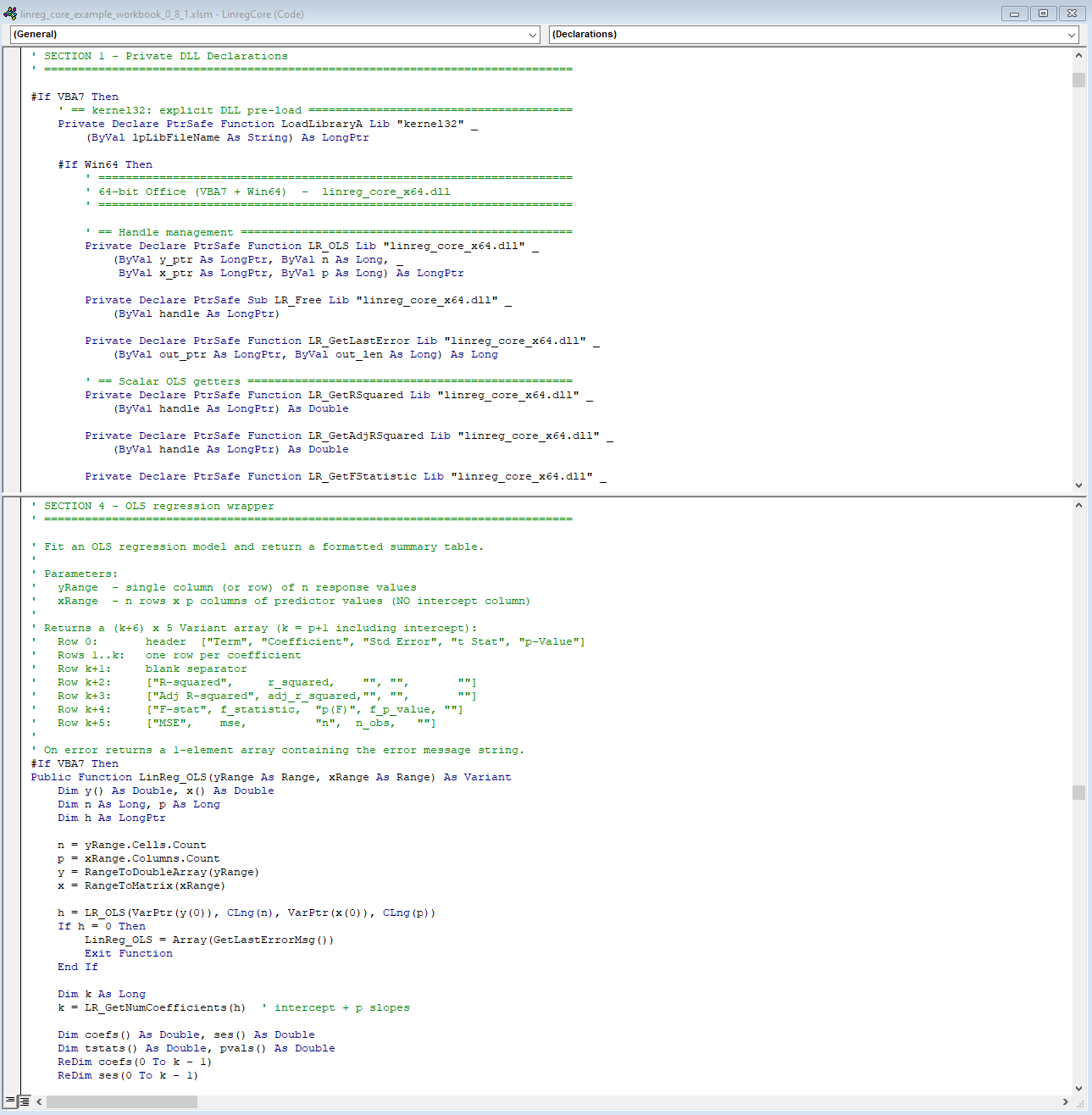
The Declaration Layer
The DLL is declared once per exported symbol, twice over (once for 64-bit Office and once for 32-bit). A compile-time #If VBA7 Then / #If Win64 Then structure handles both:
#If VBA7 Then

    #If Win64 Then
        ' 64-bit Office: linreg_core_x64.dll, LongPtr = 8 bytes
        Private Declare PtrSafe Function LR_OLS Lib "linreg_core_x64.dll" _
            (ByVal y_ptr As LongPtr, ByVal n As Long, _
             ByVal x_ptr As LongPtr, ByVal p As Long) As LongPtr
        ' ... ~50 more declarations ...

    #Else
        ' 32-bit Office: linreg_core_x86.dll, LongPtr = 4 bytes
        Private Declare PtrSafe Function LR_OLS Lib "linreg_core_x86.dll" _
            (ByVal y_ptr As LongPtr, ByVal n As Long, _
             ByVal x_ptr As LongPtr, ByVal p As Long) As LongPtr
        ' ... ~50 more declarations ...

    #End If

#Else
    ' Pre-VBA7 (Office 2007 and earlier): no PtrSafe, Long instead of LongPtr
    Private Declare Function LR_OLS Lib "linreg_core_x86.dll" _
        (ByVal y_ptr As Long, ByVal n As Long, _
         ByVal x_ptr As Long, ByVal p As Long) As Long
    ' ... 32-bit declarations only ...

#End If
PtrSafe is a VBA7 keyword that marks a Declare statement as safe for 64-bit Office. The outer #If VBA7 Then gate is what makes the file open without a compilation error in Office 2007. The inner #If Win64 Then selects the right DLL filename and uses LongPtr (which VBA compiles as Long (32-bit) under 32-bit Office and LongLong (64-bit) under 64-bit Office) to keep the same source compiling correctly on both. The pre-VBA7 #Else block supports 32-bit-only environments where PtrSafe and LongPtr do not exist; the high-level wrapper functions are all guarded by #If VBA7 Then and are unavailable there.
There is one naming trick worth calling out. The DLL exports a function called LR_Init (which just returns 1 to confirm the DLL loaded). If you declared it directly as LR_Init in VBA, it would collide with the public LR_Init() sub that calls LoadLibraryA. The solution is an Alias clause:
' Inside the #If Win64 Then branch (64-bit Office):
Private Declare PtrSafe Function LR_InitDLL Lib "linreg_core_x64.dll" _
    Alias "LR_Init" () As Long

' Inside the #Else branch (32-bit Office):
Private Declare PtrSafe Function LR_InitDLL Lib "linreg_core_x86.dll" _
    Alias "LR_Init" () As Long
VBA calls the function as LR_InitDLL; the DLL sees it as LR_Init. The two names live in separate namespaces (the VBA name is the one VBA code uses, and the alias is the symbol name that GetProcAddress resolves). Both branches use the same alias; only the Lib filename differs.
Private Helpers
Three private functions do the mechanical work that every wrapper needs.
RangeToDoubleArray converts a single-column (or single-row) Range into a 0-based Double() array, reading cells in worksheet order. This is what converts the VBA Range("B2:B21") into a pointer-ready native array.
RangeToMatrix converts a multi-column Range into a flat 0-based Double() in row-major order (row 1 col 1, row 1 col 2, …, row 2 col 1, and so on). This matches the layout the DLL expects for the predictor matrix x_ptr.
GetLastErrorMsg wraps the byte-buffer call from Section 2:
Private Function GetLastErrorMsg() As String
    Dim buf(0 To 511) As Byte
    Dim written As Long
    written = LR_GetLastError(VarPtr(buf(0)), 512)
    If written > 0 Then
        GetLastErrorMsg = Left$(StrConv(buf, vbUnicode), written)
    Else
        GetLastErrorMsg = "(unknown error)"
    End If
End Function
DiagResult is a shared helper for all diagnostic test handles. Given a handle (0 on failure, ≥1 on success), it queries the three standard getters and returns a three-element Variant array:
The Wrapper Pattern: LinReg_OLS
LinReg_OLS is the clearest illustration of the full wrapper pattern. In condensed form:
Public Function LinReg_OLS(yRange As Range, xRange As Range) As Variant
    ' 1. Convert Excel ranges to flat native arrays
    Dim y() As Double, X() As Double
    Dim n As Long, p As Long
    n = yRange.Cells.Count
    p = xRange.Columns.Count
    y = RangeToDoubleArray(yRange)
    X = RangeToMatrix(xRange)

    ' 2. Call the DLL fit function
    Dim h As LongPtr
    h = LR_OLS(VarPtr(y(0)), CLng(n), VarPtr(X(0)), CLng(p))
    If h = 0 Then
        LinReg_OLS = Array(GetLastErrorMsg())
        Exit Function
    End If

    ' 3. Query all getters into local VBA variables
    Dim k As Long
    k = LR_GetNumCoefficients(h)        ' intercept + p slopes
    Dim coefs() As Double, ses() As Double
    Dim tstats() As Double, pvals() As Double
    ReDim coefs(0 To k - 1)
    ReDim ses(0 To k - 1)
    ReDim tstats(0 To k - 1)
    ReDim pvals(0 To k - 1)
    LR_GetCoefficients h, VarPtr(coefs(0)), k
    LR_GetStdErrors    h, VarPtr(ses(0)),   k
    LR_GetTStats       h, VarPtr(tstats(0)), k
    LR_GetPValues      h, VarPtr(pvals(0)),  k
    ' ... scalar getters (r2, adjr2, fstat, fp, mse) similarly ...

    ' 4. Free the handle (all data is now in VBA-owned variables)
    LR_Free h

    ' 5. Build a 2D Variant result array
    Dim result() As Variant
    ReDim result(0 To k + 5, 0 To 4)   ' (k+6) rows × 5 columns
    result(0, 0) = "Term"
    result(0, 1) = "Coefficient"
    result(0, 2) = "Std Error"
    result(0, 3) = "t Stat"
    result(0, 4) = "p-Value"
    ' ... populate coefficient rows and summary rows ...
    LinReg_OLS = result
End Function
The step ordering matters. LR_Free h is called at step 4 (after all getter calls have already copied the Rust data into VBA-owned Double() arrays). The handle is released while those values are still live in VBA’s stack frame; the 2D result table is assembled from local VBA variables, not from the DLL. This means there is no window where the result table is being built while the handle is still open; the handle lifetime is as short as possible.
The complete return table for LinReg_OLS is a (k+6) × 5 array where k is the total number of coefficients including the intercept:
| Row | Col 0 | Col 1 | Col 2 | Col 3 | Col 4 |
|---|---|---|---|---|---|
| 0 | "Term" |
"Coefficient" |
"Std Error" |
"t Stat" |
"p-Value" |
| 1..k | term name | coefficient | std error | t-stat | p-value |
| k+1 | (blank) | ||||
| k+2 | "R-squared" |
value | |||
| k+3 | "Adj R-squared" |
value | |||
| k+4 | "F-stat" |
value | "p(F)" |
value | |
| k+5 | "MSE" |
value | "n" |
n |
The caller pastes it with a single Range.Value assignment:
Dim tbl As Variant
tbl = LinReg_OLS(Range("B2:B21"), Range("C2:F21"))
Range("H2").Resize(UBound(tbl, 1) + 1, UBound(tbl, 2) + 1).Value = tbl
UBound(tbl, 1) + 1 gives the row count (the array is 0-based so UBound = last index = rows - 1); Resize expands the single-cell anchor to exactly the right dimensions before assigning.
Error Handling Convention
Every wrapper follows the same error contract: on failure, return a single-element 0-based array containing the error message string. The check in the header comment captures it:
A 1D array with UBound = 0 is the distinguishing signature: normal OLS results are always 2D (which UBound(result, 2) would succeed on), so any 1D single-element return is an error. The PasteResult helper in ExampleMacros.bas implements this check before pasting, printing the error message into the output cell rather than crashing.
The convention avoids any VBA error-handling machinery (On Error GoTo) in the caller. The wrapper catches the failure at the DLL boundary, packages the message, and returns it as data. The caller decides what to do with it.
Diagnostic Wrappers
All ten diagnostic wrappers except Durbin-Watson share the same boilerplate (range-to-array conversion) and reduce the actual DLL call to a single DiagResult delegation:
Public Function LinReg_BreuschPagan(yRange As Range, xRange As Range) As Variant
    Dim y() As Double, X() As Double
    Dim n As Long, p As Long
    n = yRange.Cells.Count : p = xRange.Columns.Count
    y = RangeToDoubleArray(yRange) : X = RangeToMatrix(xRange)
    LinReg_BreuschPagan = DiagResult( _
        LR_BreuschPagan(VarPtr(y(0)), CLng(n), VarPtr(X(0)), CLng(p)))
End Function
DiagResult receives the handle directly as an argument (it handles the h=0 check, queries the three getters, calls LR_Free, and returns {statistic, p-value, df}). The wrapper itself never touches a handle.
LinReg_DurbinWatson is the one exception. Because DW has no p-value, it bypasses DiagResult and calls LR_GetAutocorrelation instead of LR_GetPValue for the second element, placing "" in the third:
result(0) = LR_GetStatistic(h)
result(1) = LR_GetAutocorrelation(h)   ' ρ ≈ 1 − DW/2
result(2) = ""                          ' no df for DW
LR_Free h
LinReg_DurbinWatson = result
All ten wrappers return the same outer shape (a 3-element Variant array), so the caller code that handles their output is uniform regardless of which test it came from. Note, however, that the semantics of element 1 differ: for Durbin-Watson it contains the estimated autocorrelation ρ, while for all other diagnostics it contains the p-value. Callers that iterate over diagnostic results programmatically should account for this.
SetupWorkbook
ExampleMacros.bas exists purely to demonstrate the library inside Excel. Its central function, SetupWorkbook, creates four sheets from scratch:
- OLS Example: loads the first 20 rows of the
mtcarsdataset (mpg, cyl, disp, hp, wt) with two buttons: “Run OLS” and “Prediction Intervals” - Diagnostics: a single “Run All Diagnostics” button that runs all ten diagnostic tests and writes a formatted results table
- Regularized: two editable yellow input cells for Lambda and Alpha, with buttons for Ridge, Lasso, and Elastic Net
- Instructions: a text-based guide generated programmatically, including a live call to
LinReg_Version()to embed the current DLL version string
SetupWorkbook is designed to be run once from the VBA editor after importing the two .bas files. After that, everything is driven by button clicks. The macro disables screen updating, calls four private setup subs, activates the OLS sheet, re-enables screen updating, and shows a completion dialog; a routine any VBA developer would recognize as standard workbook initialization boilerplate.
Section 8. Lessons Learned
Every section so far has described the design as it exists today (clean, layered, working). This section is about what went wrong on the way there, and the non-obvious failure modes that are still latent in any project built this way.
Handle Leaks Are Silent and Cumulative
The handle store described in Section 4 is a global HashMap behind a Mutex. Every call to a fit function (LR_OLS, LR_Ridge, LR_BreuschPagan, and so on) inserts a new entry. Every call to LR_Free removes one. If the caller forgets LR_Free, the entry stays in the map for the lifetime of the DLL (which, in Excel, means until the user closes the workbook or quits the application).
In VBA’s linear execution model, this is easy to get wrong. There is no try/finally block in VBA. If a wrapper function calls LR_OLS, receives a valid handle, and then hits a runtime error before reaching LR_Free, the handle leaks. The memory is not large per call (a single RegressionOutput is a few kilobytes), but a macro that runs a diagnostic battery across dozens of datasets in a loop can accumulate thousands of orphaned entries in a long session.
The insidious part is that nothing fails. The DLL does not slow down. VBA does not raise an error. The HashMap grows quietly. The only symptom is gradually increasing memory consumption in the Excel process, which the user will attribute to Excel being Excel.
The VBA wrappers in LinregCore.bas mitigate this by design: each high-level function calls LR_Free before returning, and the handle never escapes the function’s scope. But anyone writing custom VBA code against the raw Declare layer (skipping the wrappers) must enforce this discipline manually. There is no mechanism on the Rust side to detect or warn about leaked handles, because the DLL has no way to know whether VBA intends to call LR_Free later or has simply forgotten.
One safety property does hold: double-free is harmless. LR_Free calls HashMap::remove, which is a no-op on a missing key. The test suite validates this explicitly:
#[test]
fn test_ols_double_free_is_safe() {
    let (y, x) = simple_linear_data();
    let x_matrix = columns_to_row_major(&[x]);

    let handle = unsafe { LR_OLS(y.as_ptr(), y.len() as i32, x_matrix.as_ptr(), 1) };
    assert_ne!(handle, 0);

    unsafe {
        LR_Free(handle);
        LR_Free(handle); // Should not crash
    }
}
This means that calling LR_Free defensively (even when you are not sure whether the handle was already freed) is always safe. The cost is a single HashMap lookup that finds nothing. In a language without destructors, “safe to call twice” is a meaningful property.
ByVal vs ByRef: The Silent Crash
Every parameter in every Declare statement in LinregCore.bas uses ByVal. This is not VBA’s default (VBA defaults to ByRef when neither keyword is specified). Getting this wrong does not produce a compile error. It produces a crash, or worse, silently wrong results.
The reason is straightforward. When VBA passes a LongPtr argument ByVal, the DLL receives the value itself (the integer handle, or the pointer obtained from VarPtr()). When VBA passes it ByRef, the DLL receives a pointer to that value (the address of the VBA variable that holds the handle, not the handle itself). On the Rust side, y_ptr: *const f64 now points to a location on VBA’s stack frame that contains a pointer, not an array of doubles. slice::from_raw_parts(y_ptr, n) treats this stack address as the base of a contiguous f64 array: element 0 is the pointer value reinterpreted as a floating-point number, element 1 is whatever 8 bytes follow on VBA’s stack (a return address, another local variable, a frame pointer), also reinterpreted as a double, and so on for all n elements. The result is an access violation if the read extends past mapped memory, or silently corrupt data if it does not.
Consider this incorrect declaration:
' WRONG: ByRef is the default when omitted
Private Declare PtrSafe Function LR_OLS Lib "linreg_core_x64.dll" _
    (y_ptr As LongPtr, n As Long, x_ptr As LongPtr, p As Long) As LongPtr
Compared to the correct version:
' CORRECT: every parameter is explicitly ByVal
Private Declare PtrSafe Function LR_OLS Lib "linreg_core_x64.dll" _
    (ByVal y_ptr As LongPtr, ByVal n As Long, _
     ByVal x_ptr As LongPtr, ByVal p As Long) As LongPtr
The two look almost identical. The difference is four keywords. The consequence is the difference between working code and an unrecoverable crash with no diagnostic information. VBA does not warn you. The Rust compiler cannot help (it sees a *const f64 either way).
This also extends to scalar parameters. If n As Long is passed ByRef, the DLL receives the address of n (a 4-byte or 8-byte pointer) and interprets it as a 32-bit integer. On 64-bit Office, that pointer might be 0x00007FF6A1B0 (a 48-bit value), which when truncated to i32 yields a nonsensical observation count. The regression runs with a garbage n, reads past the end of the actual array, and either crashes or returns meaningless results.
The rule is absolute: every parameter in a Declare statement for a C-compatible DLL must be ByVal, unless you are deliberately passing a pointer-to-pointer (which this API never does). This is the single most common cause of FFI failures in VBA, and it is entirely preventable by treating ByVal as mandatory syntax rather than optional annotation.
The 32-bit .def File Discovery
Section 3 covered the .def file solution in technical detail. What it did not cover is how long it took to find the problem.
The 64-bit build worked immediately. The Declare statements resolved, the DLL loaded, regression results came back correct. The natural next step was to build the 32-bit DLL for the substantial population of enterprise users still running 32-bit Office. The build succeeded. The DLL appeared in the output directory. The file was the right size. LR_Init() confirmed the DLL loaded into the process.
Then every subsequent call failed with runtime error 453: “Specified DLL function not found.”
The DLL was loaded. The function existed (dumpbin /exports showed it in the export table). But the name in the export table was _LR_OLS@16, not LR_OLS. VBA was searching for the plain name and finding nothing.

dumpbin /exports reveals the decorated x86 name _LR_OLS@16 instead of LR_OLS.The debugging sequence went roughly like this:
- Verify the DLL is loaded (
LoadLibraryAsucceeded; confirmed). - Verify the function name is correct in the
Declarestatement (it was). - Verify
#[no_mangle]is present on the Rust export (it was). - Suspect a calling convention mismatch (switch from
extern "system"toextern "C"). This changes the calling convention fromstdcalltocdeclon 32-bit, which removes the decoration, but now VBA crashes on every call because VBA expectsstdcallon x86 and the stack cleanup is wrong. - Switch back to
extern "system"and inspect the export table withdumpbin /exports linreg_core.dll. See_LR_OLS@16. Realize the decoration is applied by the MSVC linker after Rust’s#[no_mangle]has already done its work. - Find the
.deffile solution in the MSVC linker documentation.
Steps 1 through 4 took the better part of an afternoon. The root cause (that #[no_mangle] and stdcall decoration are independent mechanisms applied at different stages) is obvious in retrospect but invisible when you are staring at a function that clearly exists and clearly cannot be found.
The lesson is specific: if a 32-bit Windows DLL export cannot be found by GetProcAddress despite the function being present, inspect the export table with dumpbin /exports and look for name decoration. The fix is a .def file. The build.rs script described in Section 3 automates it so the problem never recurs.
Testing FFI Without Excel
The most counterintuitive part of this project is that the FFI layer has a comprehensive test suite that never opens Excel.
The exported functions (LR_OLS, LR_GetRSquared, LR_Free, and the rest) are pub extern "system" fn items defined in Rust modules under src/ffi/. They are exported as DLL symbols when compiled as a cdylib, but within the same crate they are also ordinary Rust functions that can be called directly in unsafe blocks. The test suite in tests/ffi/ does exactly this:
#[test]
fn test_ols_simple_linear_regression() {
    let (y, x) = simple_linear_data();
    let x_matrix = columns_to_row_major(&[x]);

    let handle = unsafe { LR_OLS(y.as_ptr(), y.len() as i32, x_matrix.as_ptr(), 1) };
    let _guard = HandleGuard::new(handle);

    let r2 = unsafe { LR_GetRSquared(handle) };
    assert!(r2 > 0.99, "R² should be > 0.99 for linear data, got {}", r2);

    let n_coef = unsafe { LR_GetNumCoefficients(handle) } as usize;
    assert_eq!(n_coef, 2, "Should have 2 coefficients (intercept + slope)");

    let mut coefs = vec![0.0f64; n_coef];
    unsafe { LR_GetCoefficients(handle, coefs.as_mut_ptr(), n_coef as i32) };

    assert!((coefs[0] - 2.0).abs() < 0.1, "Intercept should be ~2.0, got {}", coefs[0]);
    assert!((coefs[1] - 3.0).abs() < 0.1, "Slope should be ~3.0, got {}", coefs[1]);
}
This test calls the same functions that VBA calls, with the same argument layout (raw pointers, integer sizes, scalar returns, buffer-fill getters). The only difference is that VBA obtains pointers via VarPtr() and the Rust test obtains them via .as_ptr(). The function entry point is identical.
The test infrastructure provides a HandleGuard (an RAII wrapper that calls LR_Free in its Drop implementation):
pub struct HandleGuard {
    pub handle: usize,
}

impl HandleGuard {
    pub fn new(handle: usize) -> Option<Self> {
        if handle != 0 { Some(Self { handle }) } else { None }
    }
}

impl Drop for HandleGuard {
    fn drop(&mut self) {
        unsafe { LR_Free(self.handle); }
    }
}
HandleGuard solves the problem that VBA cannot: deterministic cleanup regardless of how the test exits. If an assertion fails mid-test, Rust unwinds the stack, _guard is dropped, and LR_Free runs. No handle leaks in the test suite. This is the RAII discipline that VBA does not have, and it is precisely why the Rust tests can exercise the full handle lifecycle under failure conditions without any risk of the global store accumulating orphaned entries across test runs.
The helper columns_to_row_major mirrors what VBA’s RangeToMatrix does (it takes column vectors (the natural representation in Rust) and interleaves them into the flat row-major layout the DLL expects):
pub fn columns_to_row_major(columns: &[Vec<f64>]) -> Vec<f64> {
    let n = columns.first().map(|c| c.len()).unwrap_or(0);
    let p = columns.len();
    let mut result = Vec::with_capacity(n * p);
    for row in 0..n {
        for col in 0..p {
            result.push(columns[col][row]);
        }
    }
    result
}
Getting this layout wrong (passing column-major data where row-major is expected) does not crash. It produces a valid regression on scrambled data. The coefficients come back, R² looks plausible, and nothing signals that every predictor has been assigned the wrong column’s values. This is why the test suite includes known-answer tests with manually verified coefficients: not just “R² > 0.99” but “intercept ≈ 2.0 and slope ≈ 3.0” for y = 2 + 3x data.
The FFI test suite (tests/ffi/) runs with a single command:
It covers OLS, Ridge, Lasso, Elastic Net, all ten diagnostic tests, prediction intervals, cross-validation, influence measures, error handling, double-free safety, and invalid-handle behavior (all without Excel installed). The iteration cycle is seconds, not “rebuild the DLL, copy it to the workbook folder, open Excel, run the macro, check the cells.”
The broader lesson is that an FFI layer should be designed so that the exported functions are testable from the source language. If the only way to test your DLL is to load it into the target host (Excel, Unity, LabVIEW, whatever), your feedback loop is measured in minutes and your test coverage will be whatever you had the patience to click through manually. If the exports are also callable as native functions within the crate, your feedback loop is cargo test and your coverage is whatever you can write an assertion for.
Section 9. Is It Worth It?
The result of all this engineering is that an Excel user (someone who has never heard of Rust, does not have Python installed, and does not have admin rights on their machine) can run an OLS regression, a Lasso regularization path, a Breusch-Pagan heteroscedasticity test, or a k-fold cross-validation from a single button click in a spreadsheet. The output lands in cells. No installation, no configuration, no external process. The DLL and the workbook travel together as two files in a folder.
The cost was a handle-based C API, stdcall decoration stripping for 32-bit targets, duplicated Declare statements across two architectures, and a .def file with 75 entries. The question is whether that cost was justified, and whether any simpler path would have delivered the same result.
When This Approach Makes Sense
The approach makes sense under a specific set of conditions that happen to be common in institutional environments:
The users will not leave Excel. Not “prefer not to” (they will not). The workbook is the deliverable. The model, the data, the formatting, and the output all live in one
.xlsmfile that gets emailed, reviewed, and archived. Asking these users to export to Python, open a terminal, and run a script is asking them to change their workflow. That request will be ignored.The computation is non-trivial. A simple linear regression with 20 observations does not justify a DLL. But iterative solvers (Lasso coordinate descent, Elastic Net regularization paths across 100 lambda values), prediction intervals with matrix inversion, or a full battery of diagnostic tests across dozens of datasets; these are workloads where native performance is the difference between sub-second response and a frozen spreadsheet. The DLL returns before VBA can even redraw the screen.
The deployment must be zero-install. The target machine has Excel and nothing else. No Python, no R, no admin rights, no package manager. Dropping two files (a
.xlsmand a.dll) next to each other in a folder and having it work is a feature that no scripting-language integration can match.The numerical work is complex enough to deserve a real implementation. If you need a single linear regression, Excel’s built-in
LINESTor the Analysis ToolPak will do. If you need Ridge, Lasso, Elastic Net, ten diagnostic tests, prediction intervals, influence measures, and cross-validation (with validated output that matches R and Python), you need a library, and that library needs to live somewhere the user can reach it.
When all four conditions hold simultaneously, a native DLL is the right answer. When any one of them does not hold, a simpler alternative is probably better.
The Alternatives
COM automation. The “proper” way to extend VBA is to build a COM server (a registered DLL or EXE that exposes objects via IDispatch). VBA calls it with CreateObject("MyLib.MyClass") and gets an object with methods and properties, complete with IntelliSense in the VBA editor. COM is deeply integrated into Office and is the mechanism behind major professional add-ins (Bloomberg’s Excel integration, Reuters Eikon, and most institutional trading and risk platforms expose their APIs through COM automation).
The problem is building one. COM requires implementing IUnknown and IDispatch interfaces, registering the server in the Windows registry (which requires admin rights), managing class factories, and handling apartment threading. Rust has no native COM support. The windows crate provides COM bindings, but implementing a COM server from scratch (as opposed to consuming one) is a substantial undertaking that would dwarf the statistical library itself. And registration means the DLL cannot be deployed by simply dropping it in a folder; it must be installed. For an internal tool distributed by email, that is a dealbreaker.
XLL add-ins. An XLL is a DLL that implements the Excel C API; a set of callback functions (xlcall32) that let native code register worksheet functions, manipulate cells, and interact with Excel’s calculation engine. XLL functions appear in Excel’s function wizard alongside SUM and VLOOKUP. This is the highest-performance integration path and is what commercial add-in vendors use.
The cost is complexity. The Excel C API communicates via XLOPER12 (a tagged union type that represents every possible Excel value: number, string, array, error, reference, missing). Marshaling data in and out of XLOPER12 structures is tedious and error-prone. The API is documented primarily through the Excel XLL SDK, which assumes C or C++ and has not been significantly updated since Excel 2010. Building an XLL from Rust is possible but requires either writing a C shim layer or implementing the XLOPER12 interface in Rust from scratch. The result would be a worksheet-function add-in, not a VBA-callable library (XLL functions are designed for cell formulas, not macro procedures), though workarounds exist.
For this project (where the goal is a VBA-callable library, not worksheet functions), the XLL path adds marshaling complexity for a feature (formula-bar integration) that is not needed.
Python via xlwings. xlwings lets VBA call Python functions through a COM bridge. You write a Python function, decorate it with @xw.func, and call it from a VBA macro or directly from a cell formula. The Python function runs in a separate process and returns results to Excel.
For a library that already has Python bindings (via PyO3), this seems like the natural path: call the Python package from Excel, no DLL needed. But it reintroduces the dependency that the DLL approach eliminates (a working Python installation). The user needs Python 3.x, pip install xlwings linreg-core, and a configured xlwings.conf—all before the workbook opens. On a locked-down corporate machine without admin rights, this is often not possible. Even where it is possible, the xlwings bridge adds process-startup latency (the first call launches a Python interpreter) and cross-process data serialization overhead. For interactive use with small datasets the overhead is negligible; for batch processing or large matrices it becomes noticeable.
xlwings is the right choice when the users already have Python and the goal is rapid prototyping. It is not the right choice when the goal is a self-contained, zero-dependency deliverable.
Why It Was Worth It Here
The cost calculus for this project was different from a greenfield DLL effort, and this is the key point the alternatives comparison obscures: the library already existed. linreg-core was already built, already tested against R and Python reference implementations across 20 datasets, and already compiled to WebAssembly for browser use. The core Rust code (the QR decomposition, the coordinate descent solver, the distribution functions, every diagnostic test) did not need to change. The FFI layer was additive: 10 new files in src/ffi/, a .def file, a build.rs guard, and a VBA module. The core library’s Cargo.toml gained a single feature flag (ffi = []) with no new dependencies.
That is a fundamentally different question from “should I write a statistical library in Rust so that VBA can call it?” The answer to that question is almost certainly no (the effort would not justify the audience). But “should I spend a day adding an FFI layer to a library I already have, to reach users who cannot be reached any other way?” has a different answer. The marginal cost of the DLL was small relative to the sunk cost of the library. The marginal value (making validated statistical methods available inside Excel without any installation) was concrete and immediate.
This is the real lesson: the native DLL approach is not a general-purpose strategy for extending Excel. It is a distribution mechanism for an existing asset. The library earns its keep across multiple targets (native Rust, WebAssembly, Python via PyO3, and now VBA via FFI). The VBA surface is one more compilation target, not the reason the library exists.
The Maintenance Burden
The honest cost of the native DLL approach is not in the initial build. It is in the ongoing synchronization between four parallel surfaces that must stay in lockstep:
Rust FFI functions: 75
pub extern "system" fnitems across seven files insrc/ffi/(four are generated by adiag_fn!macro). This is the source of truth. Every exported function is defined here with its exact signature, calling convention, and#[no_mangle]attribute.The
.deffile: 75 entries inlinreg_core.def, each one a plain symbol name that the MSVC linker uses to strip stdcall decoration on 32-bit builds. Every function in surface 1 must appear here, or the 32-bit DLL will silently export a decorated name that VBA cannot find.VBA
Declarestatements: approximately 150 lines inLinregCore.bas, split across VBA7#If Win64 Then(64-bit, ~75 declarations) and VBA7#Else(32-bit, ~75 declarations), with a pre‑VBA7 32‑bit block included for reference. Each declaration must match the Rust signature exactly: parameter count, parameter order,ByValon every parameter, correct types (LongPtrfor pointers,Longfori32,Doubleforf64), and the correct DLL filename for the architecture.VBA wrapper functions: 28 public functions that hide handle management and return Excel-native arrays. Each wrapper must call the right DLL functions in the right order, free the handle on every code path, and format the output correctly.
Adding a single new feature (say, a new diagnostic test) requires changes in all four surfaces: a Rust function, a .def entry, two Declare statements (one per architecture), and a wrapper function. Forgetting any one of them produces a failure that manifests differently depending on which surface was missed:
| Forgotten surface | Symptom |
|---|---|
.def entry |
Works on 64-bit, runtime error 453 on 32-bit |
Declare statement |
Compile error in VBA (undeclared function) |
ByVal keyword |
Silent crash or corrupt results |
LR_Free in wrapper |
No immediate symptom; slow memory leak over long sessions |
None of these failures is caught by cargo test. The Rust test suite validates the FFI layer’s correctness but cannot validate VBA’s declarations or the .def file’s completeness. The 32-bit .def issue in particular is invisible until someone actually runs the 32-bit DLL (and since most development happens on 64-bit machines, it is the easiest to miss).
This is the real cost: not the initial engineering, but the discipline required to keep four representations of the same API consistent across every change. The total is manageable (it took roughly a day to build the FFI layer and the VBA wrappers once the core library existed), but it does not amortize. Every new export carries the same four-surface cost as the first one.
Whether that cost is justified depends on the audience. For a tool used by a handful of analysts on a trading desk who will never install Python, it is a bargain. For a tool whose users are comfortable with a Jupyter notebook, it is unnecessary overhead. The approach does not generalize (it solves a specific distribution problem for a specific class of user), and that specificity is precisely what makes it work.
Section 10. Conclusion
The architecture, end to end, is four layers:
Rust core: OLS, Ridge, Lasso, Elastic Net, diagnostic tests, prediction intervals, cross-validation. Custom linear algebra, custom distribution functions, no external math dependencies. This layer knows nothing about VBA, Excel, or Windows calling conventions. It is the same code that compiles to WebAssembly and links into the Python bindings.
Handle-based FFI layer: 75
extern "system"functions that wrap the core. Each computation stores its result in a globalHashMap<usize, FitResult>behind aMutexand returns an opaque integer handle. Callers retrieve individual values through typed getter functions (LR_GetRSquared,LR_GetCoefficients,LR_GetPValue) and release the handle withLR_Free. Errors go to a thread-local string buffer, retrieved viaLR_GetLastError. The pattern is the same one used by SQLite, OpenSSL, and every other C library that hands opaque pointers to callers who cannot manage memory.VBA declarations:
Declare PtrSafe Functionstatements that map each exported symbol to a VBA-callable function, with#If Win64branching between the 64-bit and 32-bit DLLs. These are the contract: parameter types, calling convention, and DLL filename, all specified exactly once.VBA wrappers: High-level functions like
LinReg_OLSandLinReg_Ridgethat accept ExcelRangeobjects, marshal the data into flat arrays, call the DLL, extract the results, free the handle, and return a 2DVariantarray that pastes directly into a worksheet. Three lines of VBA to get a coefficient table.
That is the full path from a cell reference to a regression result: Range -> RangeToDoubleArray / RangeToMatrix -> pointer -> DLL -> Rust core -> FitResult -> handle -> getter -> Variant array -> cells. Every layer has exactly one responsibility, and the boundaries between them are C-compatible scalars and pointers (the smallest possible interface that both sides can agree on).
The Broader Pattern
The handle pattern at the center of this architecture is not specific to VBA. Any caller that cannot manage Rust-owned memory (anything without destructors, move semantics, or reference counting) can use it. The caller gets an integer. The callee owns the data. The contract is: call the getter while the handle is live, then free it when you are done.
This means the same FFI layer, with no modifications, could be called from:
- Delphi/Free Pascal:
function LR_OLS(...): NativeUInt; stdcall; external 'linreg_core_x64.dll'; - C / C++:
uintptr_t __stdcall LR_OLS(...);(matching Rust’sextern "system", which isstdcallon Windows) - C#:
[DllImport("linreg_core_x64.dll")] static extern IntPtr LR_OLS(...); - Legacy FORTRAN, LabVIEW, AutoIt, MATLAB MEX: anything that can call a Windows DLL by symbol name
The .def file handles 32-bit decoration for all of them, not just VBA. The handle store does not care who is calling LR_Free. The error buffer does not care who is reading it. The entire FFI surface is caller-agnostic by construction, because the interface is C; and C is the lingua franca of cross-language interoperability on every platform.
If you have a Rust library that does real work (numerical, cryptographic, parsing, anything compute-intensive) and you have users stuck in an environment that cannot run Rust natively, the handle pattern is the way to bridge that gap. The initial design cost is a few hundred lines of unsafe wrappers and a store. The per-function cost is mechanical: write the extern "system" function, add the .def entry, write the caller-side declaration. It is tedious but not complex, and it scales linearly.
Final Thoughts
This project started with a practical question: could I make a Rust regression library callable from an Excel spreadsheet without requiring the user to install anything? The answer turned out to be yes, and the engineering required to get there (calling conventions, symbol decoration, handle management, buffer protocols, architecture-conditional linking) was more interesting than I expected.
The result is a single DLL that drops into a folder next to a workbook. An analyst opens the workbook, runs LR_Init, and calls LinReg_OLS from a macro. No Python, no R, no admin rights, no internet connection. The statistical methods behind the call are the same ones validated against R and Python across 20 datasets. The analyst does not need to know that. They just need the coefficients to appear in the right cells.
If you want to try it, the full source is at github.com/jesse-anderson/linreg-core. The FFI layer is behind the ffi feature flag. The VBA module and example workbook are in VBA_Example/. Build instructions for both 64-bit and 32-bit targets are in the repository README.
The inspiration for this came from a Chemical Engineering professor who built a process simulator in Excel with the heavy computation hidden in a DLL. It always seemed like magic. This project was my attempt to pull back that curtain using Rust, and to document something that isn’t widely discussed. The reality is that VBA is still what many engineers get stuck with in industry, regardless of whether we would prefer something more modern.

Comments